
Color Wheel Studio
Professional color tool — drag handles on the wheel, switch harmony modes to add more
Color Wheel — Find Perfect Color Harmonies Instantly
Explore colors like never before with our free interactive Color Wheel tool. Simply pick any color and instantly discover its perfect harmony combinations including Complementary, Analogous, Triadic, Tetradic, and more. Whether you are a designer, developer, or complete beginner — this tool makes color selection simple and fun.
How to Use the Color Wheel Tool
Getting started takes just seconds:
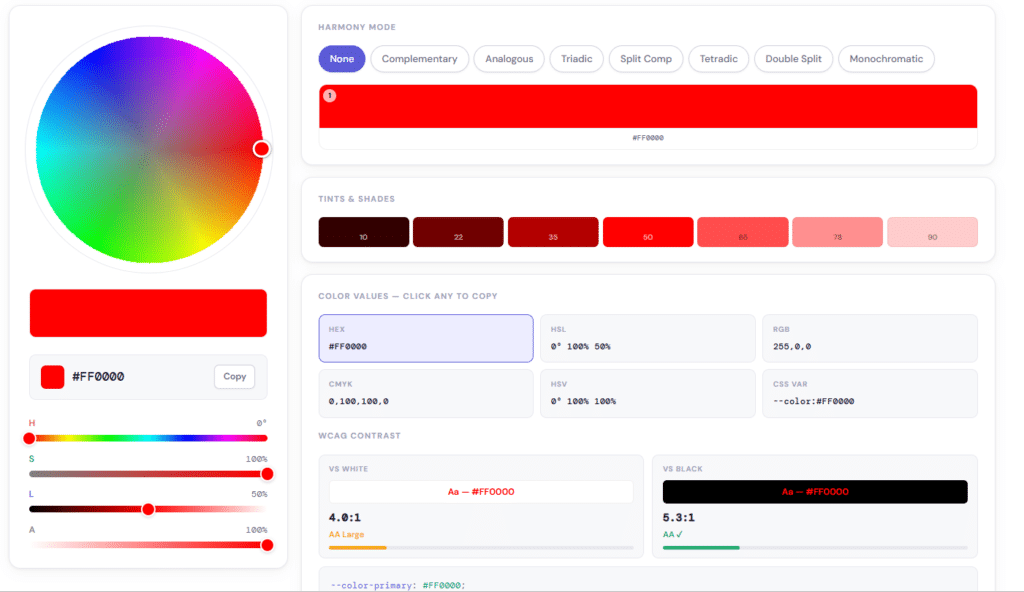
- Click anywhere on the color wheel to pick your base color
- Adjust Hue, Saturation, Lightness, and Opacity using the sliders
- Select a Harmony Mode to see matching color combinations
- Copy your color code in HEX, RGB, HSL, CMYK, HSV, or CSS format
- Use your colors in any design or development project instantly
No signup. No download. Completely free.
What Is a Color Wheel?
A color wheel is a circular diagram that shows how colors relate to each other. It was first created by Sir Isaac Newton in 1666 and has been used by artists and designers ever since. The color wheel helps you understand which colors naturally look good together and which ones clash. Our digital color wheel takes this concept and makes it interactive — so you can explore any color in the world and find its perfect matches in seconds.
Harmony Modes Explained
Our color wheel includes 7 powerful harmony modes:
None Shows your selected color on its own with all its values and shades. Perfect when you just want to explore a single color in detail.
Complementary Shows the color sitting directly opposite your chosen color on the wheel. Complementary colors create high contrast and make designs look bold and energetic. Great for call-to-action buttons and logos.
Analogous Shows three colors that sit next to each other on the color wheel. These combinations look natural, calm, and pleasing to the eye. Ideal for backgrounds, nature themes, and relaxing designs.
Triadic Shows three colors evenly spread around the color wheel. Triadic combinations are vibrant and balanced. Popular in children’s products, fun brands, and creative designs.
Split Comp A variation of complementary — instead of the exact opposite color, it shows the two colors on either side of the opposite. This gives contrast without being too harsh. Great for beginners who want bold designs.
Tetradic Shows four colors forming a rectangle on the color wheel. This gives you a rich and complex palette. Best used when one color is dominant and the others are used as accents.
Double Split Shows four colors using two split complementary pairs. This is the most complex harmony and gives maximum variety. Perfect for creative projects that need many colors.
Monochromatic Shows different tints and shades of your chosen color. These palettes look clean, minimal, and very professional. Popular in luxury brands and modern website design.
Tints and Shades
Our color wheel also shows you 7 automatic tints and shades of your selected color — from very dark to very light. This is extremely useful when you need:
- Dark versions for backgrounds and headers
- Medium versions for buttons and text
- Light versions for cards, sections, and hover effects
All tints and shades are generated automatically. Just pick your base color and all variations appear instantly.
Color Codes You Get
Our tool gives you every color format you will ever need:
HEX — Used in websites and CSS. Example: #FF0000. The most common format for web designers.
HSL — Hue, Saturation, Lightness. Example: 0° 100% 50%. Preferred by CSS developers for easy color adjustments.
RGB — Red, Green, Blue. Example: 255, 0, 0. Used in digital design software and screens.
CMYK — Cyan, Magenta, Yellow, Black. Example: 0, 100, 100, 0. Used for print design and physical materials.
HSV — Hue, Saturation, Value. Example: 0° 100% 100%. Used in many professional design applications.
CSS Variable — Ready-to-use CSS code. Example: –color: #FF0000. Copy and paste directly into your stylesheet.
Click any color value to copy it to your clipboard instantly.
WCAG Contrast Checker
Our color wheel includes a built-in WCAG Contrast Checker — a very useful feature that most color tools do not have. It automatically checks if your selected color meets accessibility standards when used on white or black backgrounds.
What is WCAG? WCAG stands for Web Content Accessibility Guidelines. These are international rules that ensure websites are readable for everyone including people with visual impairments.
What do the ratings mean?
- AA — Your color passes the standard accessibility test. Safe to use for normal text
- AA Large — Your color passes for large text and bold headings only
- AAA — Your color passes the highest accessibility standard. Best for all text
This feature is especially important for web designers and developers who want to build accessible websites that work for all users.
Who Should Use This Color Wheel?
This tool is built for everyone who works with colors:
- Web designers who need accessible and attractive color palettes
- Front-end developers who need ready-to-use CSS color codes
- Graphic designers creating logos, posters, and brand identity
- UI/UX designers building apps and digital products
- Students learning color theory and design fundamentals
- Artists and illustrators exploring color relationships
- Small business owners building their brand colors
- Social media managers creating consistent visual content
Why Our Color Wheel Is Different
Most online color tools are basic. Ours gives you everything in one place:
- Interactive color wheel with full HSL and opacity controls
- 7 harmony modes for every type of project
- Automatic tints and shades generator
- 6 color code formats with one-click copy
- Built-in WCAG accessibility contrast checker
- Works on all devices — mobile, tablet, and desktop
- No account required and completely free forever
Frequently Asked Questions
Is this color wheel tool free to use? Yes. This tool is 100% free with no limits, no signup, and no hidden charges.
What is the difference between HSL and HSV? HSL stands for Hue, Saturation, Lightness while HSV stands for Hue, Saturation, Value. HSL is more commonly used in web design while HSV is used in many design software applications like Adobe Photoshop.
What does WCAG contrast mean? WCAG contrast tells you if your text color is readable against a background color. AA rating means it passes standard accessibility guidelines and is safe to use on websites.
Can I use these colors in commercial projects? Yes. All colors generated by this tool are free to use in both personal and commercial projects.
How do I copy a color code? Simply click on any color value shown in the tool and it will be copied to your clipboard automatically.
What is the best harmony mode for website design? For most websites, Complementary or Analogous harmony works best. Complementary gives a bold professional look while Analogous gives a calm and natural feel.
Does this tool work on mobile phones? Yes. Our color wheel is fully responsive and works perfectly on all screen sizes.
Start Exploring Colors Right Now
The color wheel above is ready to use. Pick any color, explore its harmonies, check its accessibility, and copy your color codes in seconds. Whether you are designing a website, building a brand, or just learning about colors — our free Color Wheel tool gives you everything you need in one place.
Try it now — click the wheel and start creating.