
Color Converter
Instantly convert any color between HEX, RGB, HSL and CMYK formats
Color Converter: Instantly Convert HEX, RGB, HSL and CMYK
A color converter is the one tool every designer and developer reaches for dozens of times a week — and yet most of them waste time hunting through cluttered, ad-heavy pages that make a simple conversion feel like a chore. The Color Converter at ColorSchemeCalculator gives you instant, accurate conversion between HEX, RGB, HSL, and CMYK in a single clean interface — no page reloads, no distractions, no unnecessary steps.
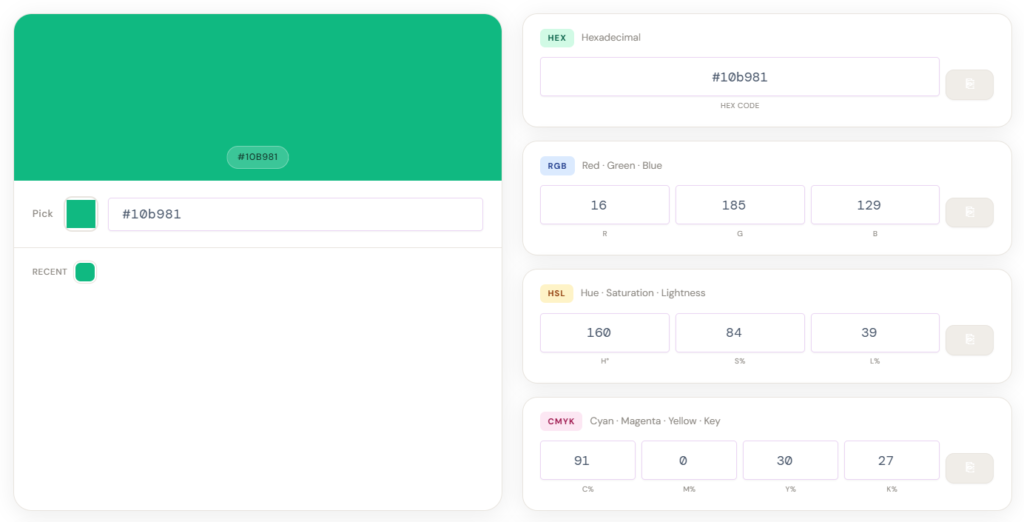
Whether you are building a website, designing a brand, preparing artwork for print, or fine-tuning a CSS stylesheet, understanding color formats and converting between them accurately is not optional — it is foundational. The format you use determines how your color behaves on screens, in code, and on printed materials, and using the wrong one costs you consistency across every medium you work in.
This guide explains every color format your converter supports, when and why each one matters, how to use the tool effectively, and the real-world workflows where fast, accurate conversion makes the difference between polished professional work and frustrating rework.
What Is a Color Converter and Why Do You Need One
A color converter is a tool that translates a color value from one notation system into its equivalent representations in other systems — so that the same color can be used accurately across different software, mediums, and workflows. The challenge is that screens, code editors, design applications, and printing presses each speak a different color language, and none of them are natively compatible with the others.
A web browser reads HEX codes and RGB values. A CSS stylesheet in 2026 increasingly uses HSL for its human-readable logic. A commercial printing press works exclusively in CMYK. A designer moving a color from a website mockup into a print brochure — or from Figma into a CSS file — needs to cross those boundaries accurately, and a single wrong digit produces a color that looks visually correct on screen but prints completely differently on paper.
The ColorSchemeCalculator color converter solves this by accepting input in any of the four major formats and outputting all equivalent values simultaneously. You enter a HEX code you pulled from a design file, and the tool instantly shows you the RGB triplet for your CSS, the HSL values for your stylesheet variables, and the CMYK breakdown for your print specification — all at once, all accurate, all ready to copy with a single click.
The Four Color Formats Your Converter Supports
HEX — The Language of the Web
HEX (hexadecimal) is the most universally recognized color format in web development and digital design. A HEX code is a six-character string preceded by a hash symbol — for example, #10b981 — where each pair of characters represents the intensity of red, green, and blue on a scale from 00 (zero intensity) to FF (full intensity) in base-16 notation.
HEX codes are compact, easy to copy and paste, universally supported across HTML, CSS, JavaScript, and virtually every design application, and immediately recognizable to anyone who works in digital environments. Their limitation is that they are not intuitive for making color adjustments — if you want to make #10b981 20% lighter, HEX gives you no direct lever to pull, which is why HSL was introduced and why converting between the two is such a common workflow.
RGB — The Native Language of Screens
RGB (Red, Green, Blue) is the additive color model that describes how digital screens produce color by mixing three channels of light at varying intensities. Each channel value ranges from 0 to 255, so a pure red is rgb(255, 0, 0), a pure white is rgb(255, 255, 255), and the teal green in the default tool display is approximately rgb(16, 185, 129).
RGB is the format most directly connected to how monitors, phone screens, and digital cameras capture and display color — it is the physics of light-based color production translated into numbers. CSS, Photoshop, Illustrator, Figma, and virtually every digital tool natively reads and writes RGB values. The format’s limitation is the same as HEX: its three numbers do not map intuitively to the human experience of color as having a particular hue, vividness, and brightness — which is exactly what HSL was designed to provide.
HSL — The Designer’s Color Language
HSL (Hue, Saturation, Lightness) is the color format that makes intuitive sense to human beings rather than to machines. Rather than mixing three channels of light, HSL describes a color the way a designer would think about it: what color is it (Hue, measured in degrees from 0° to 360° on a color wheel), how vivid or washed-out is it (Saturation, from 0% to 100%), and how light or dark is it (Lightness, from 0% black to 100% white).
HSL has become the dominant format in modern CSS development because it is directly manipulable in ways HEX and RGB are not. If you have a brand color and you need a lighter version for a hover state, a darker version for a pressed state, and a very light tint for a background, HSL lets you keep the hue constant and adjust lightness numerically — a workflow that is genuinely useful and that HEX makes nearly impossible without a converter. The growing adoption of CSS custom properties and design tokens in 2025 and 2026 has accelerated HSL usage significantly, making HEX-to-HSL and HSL-to-HEX conversion one of the most frequent operations any front-end developer performs.
CMYK — The Language of Print
CMYK (Cyan, Magenta, Yellow, Key/Black) is the subtractive color model used for physical printing. Where RGB and HEX describe colors by adding light together on a screen, CMYK describes colors by subtracting light through layers of ink on paper — which is a fundamentally different physical process and produces a fundamentally different color gamut.
Each CMYK value is expressed as a percentage from 0% to 100%, and the combination of the four inks defines the final printed color. A pure cyan is cmyk(100, 0, 0, 0). A rich black used in professional printing is typically cmyk(60, 40, 40, 100) rather than just cmyk(0, 0, 0, 100), because the additional color channels add depth that the black ink alone cannot produce. Understanding CMYK matters because the gamut — the range of colors that CMYK can physically reproduce — is significantly smaller than the RGB gamut, which means that vivid, saturated digital colors frequently cannot be reproduced accurately in print, and converting between them requires both a converter and realistic expectations about what the printed output will look like.
How to Use the Color Converter
The ColorSchemeCalculator color converter is designed for speed. The tool runs in your browser without page reloads, updates all output formats simultaneously as you type, and includes copy buttons on every output so you can paste values directly into your code editor or design application without transcribing numbers by hand.
To convert a color you already have, paste or type the value into the appropriate input field — a HEX code including or excluding the hash symbol, three RGB values, HSL degrees and percentages, or CMYK percentages — and the tool immediately populates all other format fields with the correct equivalent values. The visual color swatch updates in real time so you can confirm you are working with the right color before copying anything.
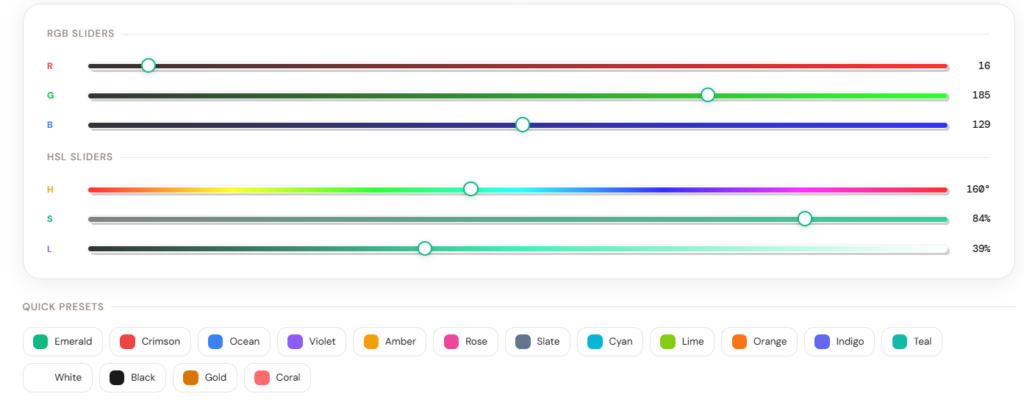
To explore and adjust a color visually, use the RGB sliders and HSL sliders embedded below the main converter. The RGB sliders let you push individual red, green, and blue channel values and watch the color change in real time. The HSL sliders are particularly powerful for design work: dragging the Hue slider rotates your color around the color wheel while preserving its saturation and lightness, and dragging the Lightness slider produces instant lighter and darker variants of the same hue — a workflow that would require multiple tool visits and manual hex code lookups without the live slider interface.
The quick presets section provides a curated set of commonly used color values that work as starting points for design work or as reference conversions. Click any preset to load its values across all four format fields instantly, then modify from there using the sliders or direct input.
When to Use Each Color Format
Use HEX for HTML and CSS
HEX is the default format for HTML attributes and CSS stylesheets, and it is what you should use when writing color values directly in code. It is universally recognized, compact, and copy-paste friendly across every web development context — from inline styles to Tailwind configuration files to design token JSON.
The practical rule is: if your final destination is a CSS file or an HTML document and you are not doing any dynamic color manipulation, HEX is the format to use.
Use RGB When Working With JavaScript or Canvas
RGB values become necessary when working with the CSS rgb() and rgba() functions, when dynamically manipulating color values in JavaScript, or when working with the HTML5 Canvas API and WebGL, both of which require RGB channel values for color operations. The rgba() function — which adds an alpha channel for transparency — is exclusively an RGB-based notation and is the correct format for any CSS property requiring semi-transparent color.
Use HSL for Dynamic CSS and Design Systems
HSL is the format to reach for whenever you need to create color variations programmatically or maintain consistent color relationships across a design system. The ability to increment lightness or shift hue by a fixed amount while keeping other properties constant makes HSL invaluable for generating hover states, focus rings, disabled colors, tinted backgrounds, and the full range of contextual color variations that a professional design system requires.
In modern CSS with custom properties, storing brand colors as HSL variables and generating variants by overriding the lightness value is considered best practice because it makes the relationships between color values explicit and maintainable.
Use CMYK for Print and Production Files
Any time a color is leaving the digital environment and entering a physical printing process, CMYK is the required format. This includes business cards, brochures, packaging, signage, fabric printing, and any other application where ink on a physical surface must reproduce a color that originated on screen.
The most important practical knowledge for print workflows is that you should always convert your RGB or HEX digital colors to CMYK before sending files to a printer, and you should expect some colors to shift. Saturated neons, electric blues, and vivid greens that display brilliantly on screen often have no exact CMYK equivalent — the gamut simply does not extend that far — and a professional print workflow requires reviewing proofs with those conversions visible before approving a print run.
Common Color Conversion Workflows
Web Design to Print Production
This is the most frequently encountered conversion challenge in professional design work. A designer builds a website with a brand color defined as #0066CC and then needs to print business cards using the same color. The correct workflow is to run the HEX value through the color converter, note the CMYK output, and provide those four percentages to the print shop rather than the HEX code — because a print shop’s RIP software will produce a more accurate result when given CMYK values than when internally converting from RGB.
CSS Stylesheet Color Management
Front-end developers working with design tokens, Tailwind configuration, or CSS custom properties frequently receive colors from designers in HEX format but need HSL equivalents for dynamic styling. Converting a brand color palette from HEX to HSL takes minutes with the converter and enables the entire hsl(var(--hue), var(--saturation), var(--lightness)) pattern that makes CSS design systems significantly more maintainable.
Brand Color Documentation
A complete brand color documentation package typically needs to include HEX values for digital and social media, RGB values for screen-based applications, HSL values for CSS implementations, and CMYK values for print. Rather than calculating each conversion manually or visiting multiple tools, running each brand color through the ColorSchemeCalculator converter and recording all four outputs simultaneously is the fastest and most accurate way to build a complete color specification document.
Extracting Colors From Design Files
When you identify a color in a screenshot, a design file, or a reference image and need its values for a project, a color picker gives you the RGB or HEX value — and the converter takes you the rest of the way. Paste the HEX from your eyedropper tool, and the CMYK breakdown, HSL values, and RGB triplet are all instantly available without touching a secondary tool.
Understanding Color Gamut and Format Limitations
One of the most practically important things to understand about color conversion is that HEX, RGB, and HSL all describe colors within the sRGB color space — the standard color space of screens — while CMYK describes the narrower gamut of physical printing. Converting between HEX, RGB, and HSL produces mathematically exact equivalents because they are all representations of the same underlying sRGB color. Converting any of those formats to CMYK is an approximation because the physical gamut of ink on paper cannot reproduce every color that screens can display.
This means that when you convert a vivid electric blue like #0080FF to CMYK, the resulting ink values will produce a color that is perceptually close but not identical to what you see on screen — and the degree of shift depends on the specific printing process, ink set, paper stock, and press calibration involved. For critical color-matching applications like brand identity work, the conversion should always be verified against a physical Pantone swatch or a press proof rather than relying solely on the numeric output of any digital converter.
For everyday design and development work — generating hover states, building color palettes, writing CSS, converting web colors for print reference — the converter’s output is accurate and immediately usable.
Tips for Getting the Most From the Converter
Using the HSL sliders to explore color relationships is significantly more productive than manually adjusting HEX values. Locking a hue at a fixed degree and varying lightness from 20% to 80% produces a complete tonal range for that hue — which is the foundation of generating a color scale for a design system, a chart palette, or a UI component library.
When working on a brand project, convert the primary brand color first, then use the HSL hue value as a fixed anchor and generate secondary and tertiary palette colors by shifting the hue by 30°, 60°, 120°, or 180° — these correspond to analogous, split-complementary, triadic, and complementary color relationships respectively, and they produce harmonious palettes by design.
For print projects, always check your CMYK total ink coverage. Adding all four CMYK percentages together gives you the total ink density — professional offset printing typically requires a maximum total ink coverage of 240% to 300% depending on the press and paper, and colors with very high combined values can cause drying problems, show-through, and color shift in production.
Frequently Asked Questions About the Color Converter
What is the difference between HEX and RGB?
HEX and RGB represent identical colors in different notation — HEX is a compact base-16 string while RGB expresses the same red, green, and blue channel values as three decimal integers from 0 to 255.
Why does my color look different after converting to CMYK?
CMYK has a narrower gamut than RGB, so saturated and vivid screen colors often have no exact printable equivalent — the converter shows the closest reproducible CMYK value, not a mathematically identical match.
Can I convert CMYK back to HEX accurately?
Converting CMYK to HEX produces the closest sRGB screen equivalent, but because the two color spaces have different gamuts, the round-trip conversion from HEX to CMYK and back will not always return the exact original HEX value.
Which format should I use in my CSS stylesheet?
Use HEX for static color values and HSL for dynamic values where you need to generate variants — lighter shades, darker shades, or hue-shifted colors — programmatically using CSS custom properties.
Does the converter support transparency or alpha values?
The converter handles HEX, RGB, HSL, and CMYK solid color values — for transparency, the RGBA format adds a fourth alpha channel (0 to 1) to the RGB output, which you can apply manually to the converted RGB values in your CSS.
How accurate is the HEX to CMYK conversion?
The conversion uses the standard mathematical formula mapping sRGB values to CMYK percentages and is accurate for digital reference and print specification purposes — for critical print production, always verify against a physical proof or Pantone swatch.