Every color a browser renders is stored as numbers. RGB and HEX are simply two different ways of writing those same numbers down, and developers move between them constantly pulling a value from a design file, sampling a pixel with a browser DevTools eyedropper, or matching a brand color across a website, a mobile app, and a print spec sheet. Getting the conversion wrong by even one digit produces a visibly different color, which is why understanding the underlying math not just pasting numbers into a tool matters for anyone maintaining a design system at scale. This guide covers the conversion formula, a ready-to-use chart, common notation alternatives, and how to convert RGB to HEX instantly with the free calculator.
| Quick Answer
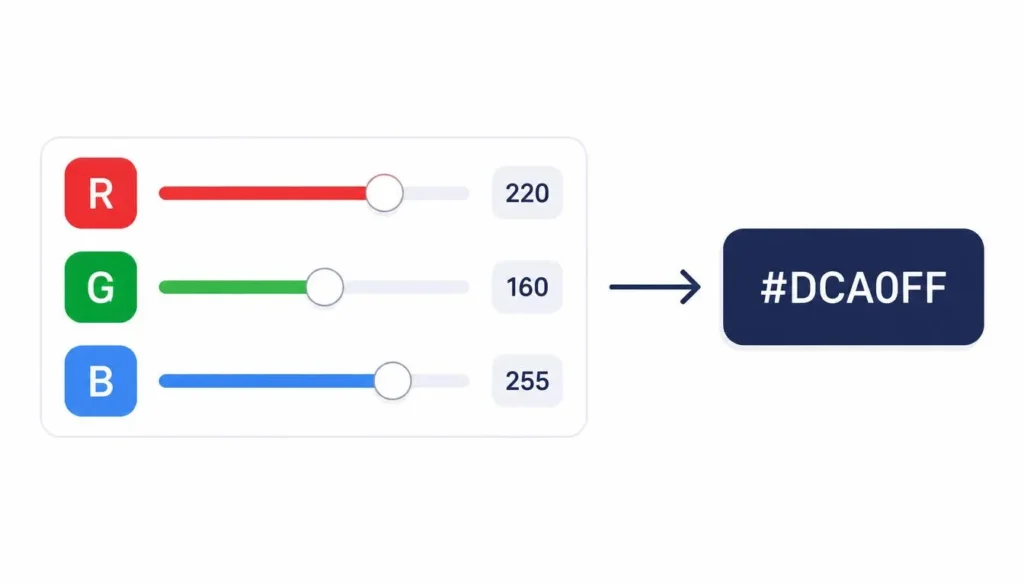
RGB to HEX conversion changes three decimal values (0–255) for red, green, and blue into a six-digit hexadecimal code. Each channel is converted to a two-digit hex pair, and the three pairs are combined into one string prefixed with #. For example, RGB(255, 87, 51) converts to #FF5733. |
What Is RGB to HEX Conversion?
RGB and HEX are two notations for the same underlying color value converting between them doesn’t change the color, only how it’s written. RGB describes a color using the additive color model: red, green, and blue light combined at different intensities to produce every color visible on a screen. Each of the three components is an 8-bit color channel, which means it can hold 256 possible values, from 0 (no light) to 255 (full intensity). Browsers and displays render these values inside the sRGB color space, the standard color profile that defines exactly how an RGB number maps to real light output on screen.
HEX (short for hexadecimal) expresses the same three channel values in base-16 instead of base-10. Where RGB counts 0 through 255, hexadecimal counts using 0–9 and then A–F, so each channel is compressed into just two characters. The result is a compact six-digit hex triplet the format you see everywhere in CSS, design tools, and brand style guides.
The RGB to HEX Formula (Manual Conversion Logic)
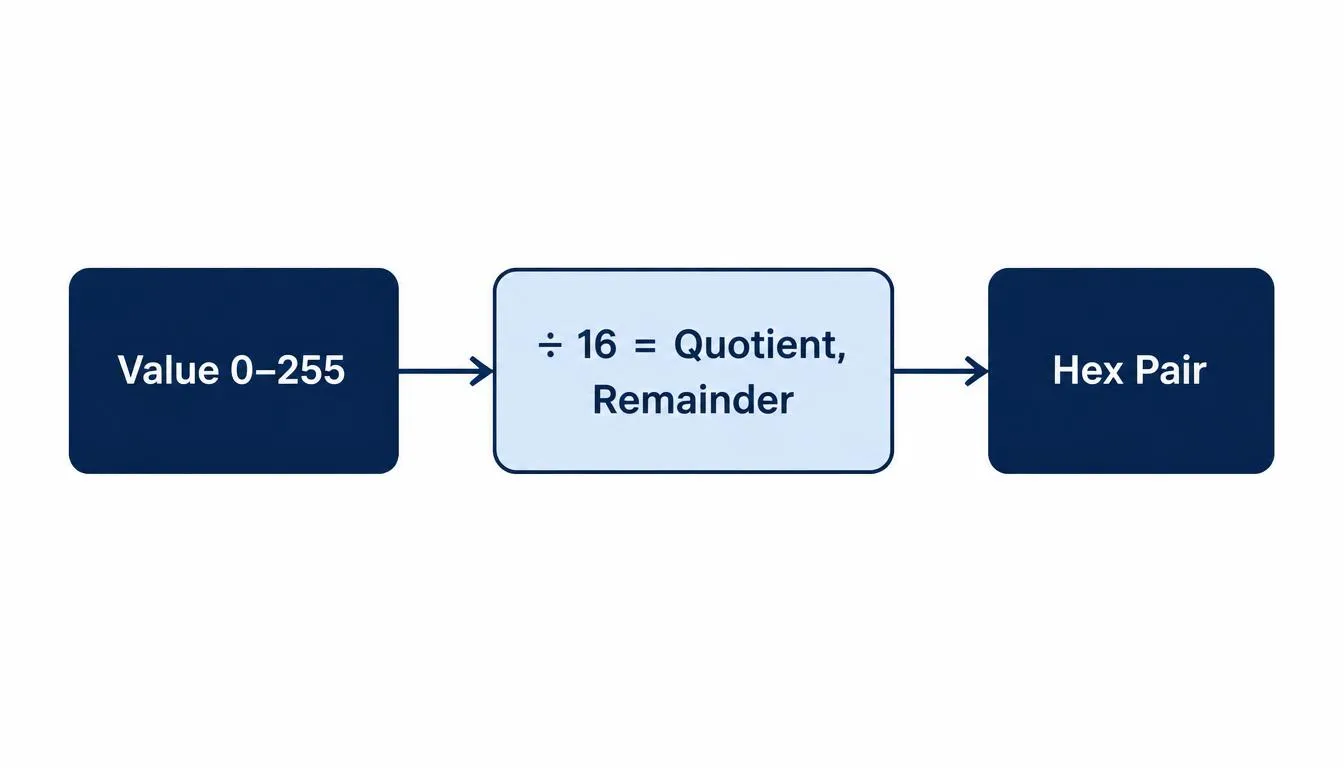
Converting a channel value from RGB to HEX is a base conversion, not a lookup. For each channel value V (0–255):
- Divide V by 16. The whole-number result is the first hex digit.
- Take the remainder of that division. It becomes the second hex digit.
- Map any value from 10–15 to its hex letter: 10=A, 11=B, 12=C, 13=D, 14=E, 15=F.
- Combine the two digits per channel, then concatenate red, green, and blue in order, prefixed with #.
Step-by-Step Example: Converting RGB(255, 87, 51) to HEX
| Channel | Value | Divide by 16 | Quotient → Remainder | Hex Pair |
| Red | 255 | 255 ÷ 16 | 15 → 15 (F, F) | FF |
| Green | 87 | 87 ÷ 16 | 5 → 7 (5, 7) | 57 |
| Blue | 51 | 51 ÷ 16 | 3 → 3 (3, 3) | 33 |
Result: RGB(255, 87, 51) = #FF5733
Two More Worked Examples (Leading Zeros and Even Division)
The example above never needs a leading zero, which hides one of the most common manual-conversion mistakes. These two additional examples show a channel that divides evenly and a channel low enough to require a leading zero:
| RGB Input | Digit-by-Digit Conversion | Final HEX |
| rgb(16, 200, 5) | 16→10, 200→C8, 5→05 | #10C805 |
| rgb(24, 119, 242) | 24→18, 119→77, 242→F2 | #1877F2 |
In the first row, the blue channel (5) divides as 0 with a remainder of 5 both digits still have to be written out, giving 05, not 5. Dropping that leading zero is the single most common error when converting RGB to HEX by hand; #10C85 is not a valid six-digit code.
Six-Digit Hex Triplet vs. Three-Digit Shorthand
The standard hex format is a six-digit hex triplet in the pattern #RRGGBB two characters per channel, three channels total. CSS also accepts a three-digit shorthand, but only when every channel pair is made of two identical digits. #FFFFFF, for instance, shortens to #FFF because each pair (FF, FF, FF) repeats a single digit; #FF0000 shortens to #F00 the same way. A color like #FF5733 cannot be shortened, because none of its pairs repeat a digit. Browsers expand shorthand automatically by duplicating each character, so #FFF and #FFFFFF always render identically shorthand is a writing convenience, not a different color.
RGB vs. HEX vs. HSL: Choosing the Right Color Notation
A third notation shows up constantly in modern CSS alongside RGB and HEX: HSL, which stands for hue, saturation, and lightness. All three describe the exact same underlying colors in the sRGB color space the difference is purely how the numbers are organized, and that organization makes each notation better suited to different tasks.
| Notation | Format | Same Color Written As | Best Used For |
| RGB | rgb(R, G, B) | rgb(255, 87, 51) | Direct channel math, opacity via rgba() |
| HEX | #RRGGBB | #FF5733 | Compact storage, design handoff, brand docs |
| HSL | hsl(H, S%, L%) | hsl(11, 100%, 60%) | Programmatic tints, shades, and hover states |
HSL earns its place for one specific reason: adjusting lightness. Creating a hover or active-state variant of a color in RGB or HEX means recalculating all three channels by hand or running a color function. In HSL, the hue and saturation stay untouched and only the lightness percentage changes hsl(11, 100%, 60%) becomes a lighter hover state at hsl(11, 100%, 70%) with a single number edit. That’s why component libraries and design tokens increasingly store a base HSL value and derive tints, shades, and states from it programmatically, even when the final rendered value is exported back to HEX for production CSS.
RGB to HEX Conversion Chart (Common Color Cheat Sheet)
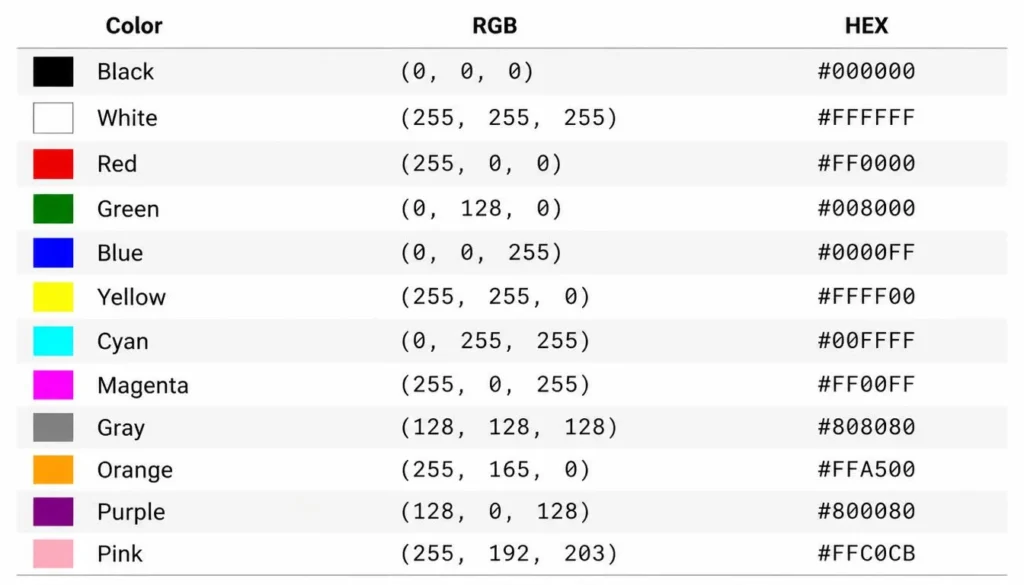
A quick-reference chart for the colors developers convert most often:
| Color | RGB | HEX |
| Black | rgb(0, 0, 0) | #000000 |
| White | rgb(255, 255, 255) | #FFFFFF |
| Red | rgb(255, 0, 0) | #FF0000 |
| Green | rgb(0, 128, 0) | #008000 |
| Blue | rgb(0, 0, 255) | #0000FF |
| Yellow | rgb(255, 255, 0) | #FFFF00 |
| Cyan | rgb(0, 255, 255) | #00FFFF |
| Magenta | rgb(255, 0, 255) | #FF00FF |
| Gray | rgb(128, 128, 128) | #808080 |
| Orange | rgb(255, 165, 0) | #FFA500 |
| Purple | rgb(128, 0, 128) | #800080 |
| Pink | rgb(255, 192, 203) | #FFC0CB |
Shades and Tints: Extending a Single Hex Value
Most real interfaces need more than one version of a brand color a lighter tint for backgrounds or disabled states, a darker shade for hover and active states. A tint mixes a color toward white (raising each channel toward 255); a shade mixes it toward black (lowering each channel toward 0), always in the same proportion across all three channels so the hue stays consistent:
| Variant | RGB | HEX |
| Base | rgb(255, 87, 51) | #FF5733 |
| Tint +20% (lighter) | rgb(255, 121, 92) | #FF795C |
| Tint +40% (lighter) | rgb(255, 154, 133) | #FF9A85 |
| Shade ‒20% (darker) | rgb(204, 70, 41) | #CC4629 |
| Shade ‒40% (darker) | rgb(153, 52, 31) | #99341F |
HEX to RGB Conversion (Reverse Process)
Going from hex to rgb reverses the same logic: split the six-digit code into three two-digit pairs, then convert each pair from base-16 back to base-10. Using #FF5733 FF converts to 255, 57 converts to 87, and 33 converts to 51 which reconstructs rgb(255, 87, 51). Any HEX to RGB converter is simply automating this pair-by-pair lookup; the free calculator handles both directions from the same input field.
RGB, HEX, and CMYK: How the Color Models Differ
RGB and HEX both describe light emitted from a screen using the additive color model. CMYK is built for print and works the opposite way: cyan, magenta, yellow, and key (black) ink are layered on a white page, subtracting light rather than adding it. Because CMYK output depends on ink, paper, and printer calibration, a cmyk to rgb conversion is an approximation rather than an exact formula the same CMYK values can look slightly different across printers, while an RGB or HEX value renders identically on any correctly calibrated screen.
Alpha transparency adds a fourth value on top of RGB or HEX. An RGBA to HEX converter appends a fourth channel opacity from 0 to 255 onto the standard three. In modern CSS, this is written as an 8-digit hex code, #RRGGBBAA, where the last pair sets transparency: FF is fully opaque and 00 is fully transparent.
This is also why a brand’s digital hex code and its printed Pantone or CMYK equivalent rarely match perfectly on close inspection. The screen version is built from emitted light in the sRGB space; the printed version is built from reflected light bouncing off ink and paper stock. Style guides that need both usually list each value separately rather than expecting one to derive cleanly from the other.
Using RGB and HEX Codes in CSS
HEX is the most common way to write html color codes in CSS because it’s short, unambiguous, and copy-paste friendly straight from design tools. Older guidance around “web safe colors” a 216-color palette built for 8-bit displays is now largely obsolete, since virtually every screen in use today supports the full 16.7-million-color range that six-digit hex can express.
For anything beyond a single value, CSS custom properties keep color systems maintainable. Defining a hex value once and referencing it by name means a rebrand or theme change touches one line instead of hundreds:
| :root {
–color-primary: #FF5733; –color-primary-rgb: 255, 87, 51; }
.button { background-color: var(–color-primary); background-color: rgba(var(–color-primary-rgb), 0.85); } |
Storing both the hex and comma-separated RGB versions of a color as custom properties, as shown above, lets you use rgba() for opacity control without hardcoding a second color value. Once a palette is locked in, it’s worth running the set through a WCAG color contrast checker to confirm text-on-background pairs stay accessible.
Hex Values in Sass/SCSS and Tailwind CSS
CSS custom properties aren’t the only place hex values live in a modern codebase. Sass variables predate custom properties and still ship in plenty of production stylesheets; Tailwind CSS, meanwhile, accepts a hex value directly inside a utility class using square-bracket syntax, with no config file required:
| // Sass / SCSS
$color-primary: #FF5733;
.card { border-color: $color-primary; }
<!– Tailwind CSS: arbitrary value –> <div class=”bg-[#FF5733] text-white”>…</div>
// tailwind.config.js: reusable token module.exports = { theme: { extend: { colors: { primary: ‘#FF5733’ }, }, }, }; |
Common RGB to HEX Mistakes (and How to Avoid Them)
- Dropping the leading zero. A remainder under 10 still needs two hex characters 05, not 5 as shown in the worked example above.
- Forgetting the # prefix. CSS and most tools require it on hex values; RGB values, by contrast, never use one.
- Using invalid characters. Hexadecimal digits stop at F. A code containing G, H, or any letter beyond F like #GG5733 is invalid and will be ignored or throw an error.
- Assuming HEX is case-sensitive. It isn’t. #FF5733 and #ff5733 render identically; lowercase is a style convention, not a functional requirement.
- Mixing up channel order. RGB is always red, then green, then blue. Transposing green and blue is a common transcription error when converting by hand.
- Applying alpha to a six-digit code. Standard hex has no transparency channel. Adding two extra digits for alpha requires the 8-digit format and current browser support check before relying on it for older targets.
How to Use the Free RGB to HEX Calculator
The calculator on the color converter page removes the manual math entirely:
- Enter red, green, and blue values (0–255) directly, or pick a color visually.
- The six-digit HEX code generates instantly, alongside the equivalent RGB and CSS-ready syntax.
- Copy the value straight into a stylesheet, design file, or brand guide.
Try it directly on the RGB to HEX calculator and once you have a hex value you like, drop it into the color palette generator to build out a complete, coordinated scheme around it.
Frequently Asked Questions
What is the difference between RGB and HEX?
They represent the exact same color value in different number systems. RGB uses three base-10 numbers (0–255) per channel; HEX condenses those same values into a six-character base-16 string. Neither is more accurate than the other HEX is simply shorter and easier to drop into code.
How do I convert RGB to HEX without a calculator?
Divide each RGB value by 16, convert the whole-number quotient and the remainder into their hex digit equivalents (0–9, then A–F for 10–15), and combine both digits per channel into a six-character string, as shown in the worked example above.
Can a HEX code represent transparency?
A standard six-digit hex code cannot include opacity. Modern browsers support an 8-digit hex format, #RRGGBBAA, where the final two digits set alpha transparency from 00 (fully transparent) to FF (fully opaque).
Why does my RGB to HEX conversion look different in design software than in a browser?
Different applications sometimes use different color profiles Adobe RGB versus sRGB, for example. Since sRGB is the standard color space for the web, confirm your source application is set to sRGB before pulling RGB values you plan to use in CSS.
Is #FFF the same color as #FFFFFF?
Yes. #FFF is the three-digit shorthand form of #FFFFFF. Browsers expand shorthand by duplicating each character, so the two always render as identical, pure white.
Is HEX case-sensitive?
No. #FF5733 and #ff5733 refer to the exact same color hex letters A–F work identically whether they’re uppercase or lowercase. Many style guides prefer lowercase for readability, but it has zero effect on how the color renders.
What’s the difference between HEX and HSL?
Both describe the same color space, but HSL organizes color by hue, saturation, and lightness rather than by three light-intensity channels. HSL makes it easier to create a lighter or darker variant of a color programmatically just change the lightness percentage while doing the same in HEX or RGB means recalculating all three channel values.
Can I mix RGB and HEX values in the same stylesheet?
Yes. Browsers treat the two formats as fully interchangeable, so nothing prevents a single stylesheet from using both. Many teams standardize on one format for consistency, but mixing them causes no functional or rendering issue.