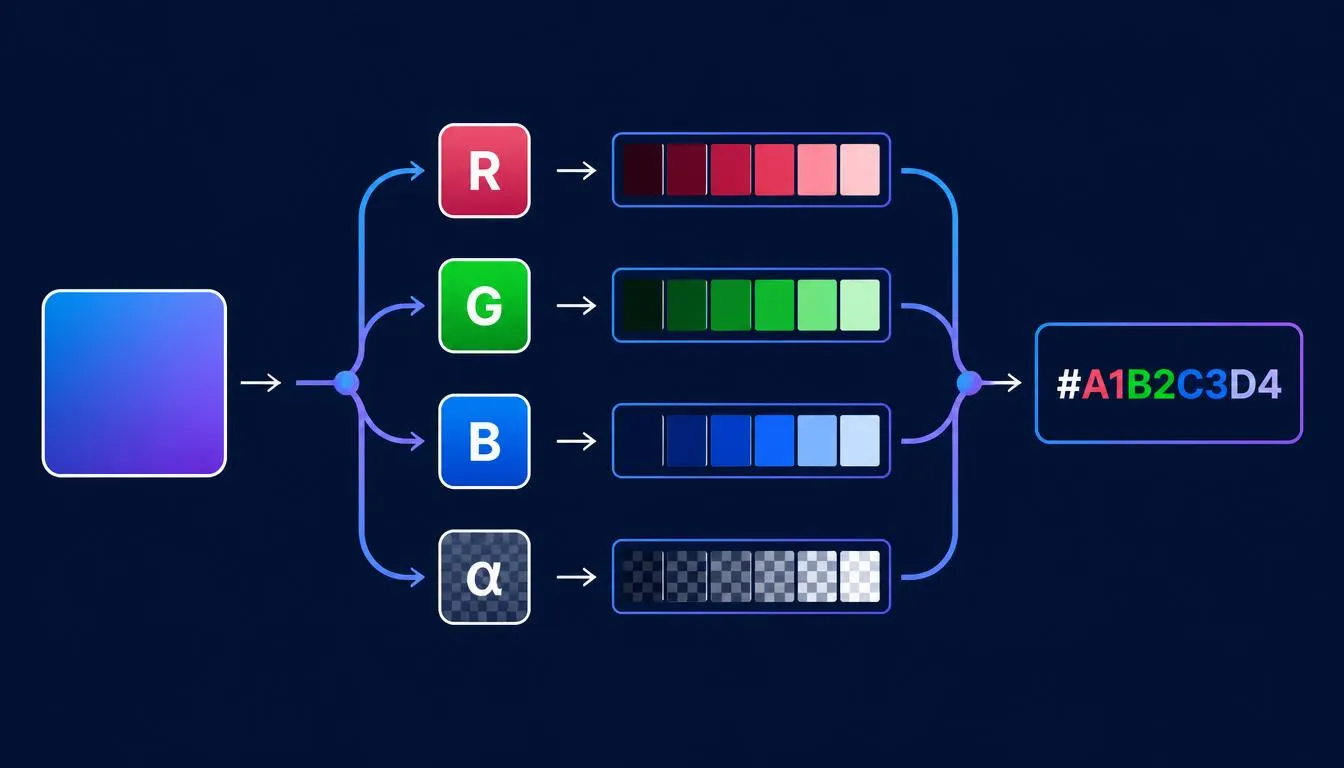
Converting RGBA to HEX is two small, fixed operations, not one complicated one: convert red, green, and blue exactly as you would for plain RGB, then convert alpha from its 0–1 scale into a 00–FF hex byte and append it. This guide walks through that math without hand-waving, covers where 8-digit HEX breaks between platforms, and, the part most articles skip, explains why an opacity value quietly breaks a contrast-ratio check. If you just need the numbers crunched, run your values through the RGBA to HEX converter and come back for the logic behind why it works.
What RGBA Actually Encodes (Color + Alpha, Not Just Color)
RGBA packs four channels into one value: red, green, and blue on a 0–255 scale, plus alpha, the opacity channel, on a separate 0–1 scale. That fourth channel is the entire reason RGBA and plain RGB aren’t interchangeable in a conversion pipeline.
- R, G, B: 0–255 integers, identical to standard RGB.
- A (alpha): 0 (fully transparent) to 1 (fully opaque), expressed as a decimal fraction.
Standard 6-digit HEX (#RRGGBB) has no field for that fourth value. Converting RGBA to HEX without losing data means extending HEX to 8 digits, which is exactly what the next section covers.
RGBA to HEX Converter: The Exact Conversion Formula
The conversion runs as two independent operations: convert R, G, and B the same way you would for plain RGB, then convert alpha separately and append it as a fifth and sixth character.
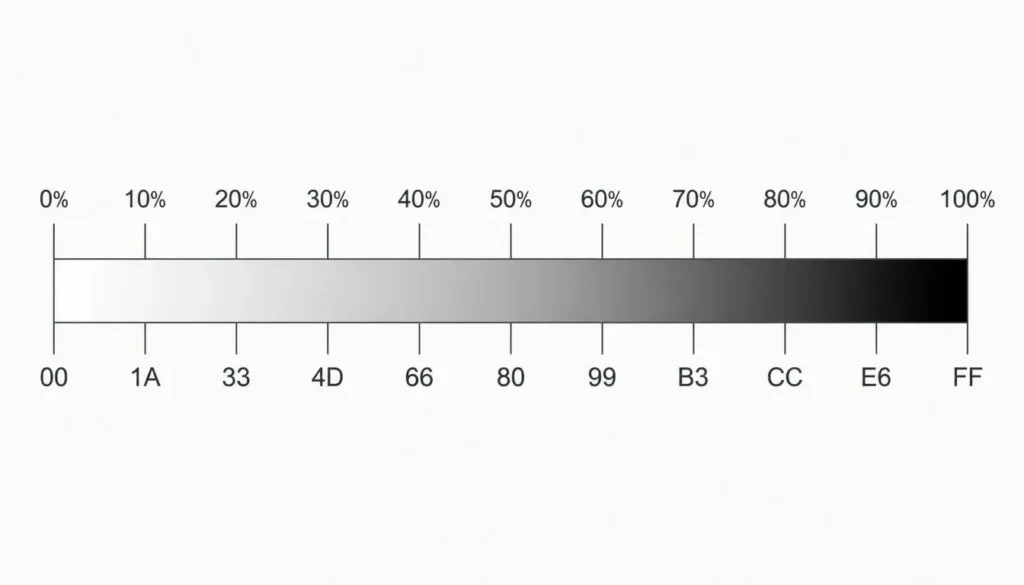
Alpha (0–1) to Hex (00–FF) Lookup Logic
Alpha isn’t converted with the 0–255 math you’d expect from a color channel, it starts on a 0–1 scale. The formula:
| hexAlpha = round(alpha * 255).toString(16).padStart(2, ‘0’) |
Quick reference for common opacity values:
| Opacity | Alpha (0–1) | Hex (00–FF) |
| 100% | 1.0 | FF |
| 90% | 0.9 | E6 |
| 80% | 0.8 | CC |
| 70% | 0.7 | B3 |
| 60% | 0.6 | 99 |
| 50% | 0.5 | 80 |
| 40% | 0.4 | 66 |
| 30% | 0.3 | 4D |
| 20% | 0.2 | 33 |
| 10% | 0.1 | 1A |
| 0% | 0.0 | 00 |
Step-by-Step Manual Example
Take rgba(37, 99, 235, 0.72), a common UI blue at 72% opacity.
- Convert R: 37 → 25
- Convert G: 99 → 63
- Convert B: 235 → EB
- Convert alpha: 0.72 × 255 = 183.6 → round to 184 → B8
- Concatenate: #2563EBB8
As a reusable function:
| function rgbaToHex(r, g, b, a) {
const toHex = (n) => Math.round(n).toString(16).padStart(2, ‘0’).toUpperCase(); const alphaHex = Math.round(a * 255).toString(16).padStart(2, ‘0’).toUpperCase(); return `#${toHex(r)}${toHex(g)}${toHex(b)}${alphaHex}`; }
rgbaToHex(37, 99, 235, 0.72); // “#2563EBB8” |
8-Digit HEX Explained: #RRGGBBAA vs 6-Digit HEX
An 8-digit HEX code is a 6-digit HEX code with two extra characters appended for alpha: #RRGGBBAA. Support landed with the CSS Color Module Level 4 spec, and every major browser, Chrome, Firefox, Safari, and Edge, has supported it since roughly 2020. Two gotchas still trip up developers moving between platforms:
- Byte order isn’t universal. CSS uses #RRGGBBAA (alpha last). Android’s ARGB hex format uses #AARRGGBB (alpha first). Copying a value between a stylesheet and an Android resource file without checking order silently corrupts the color.
- 4-digit shorthand exists too. #RGBA is the shorthand equivalent of #RRGGBBAA, following the same doubling rule as 3-digit HEX.
CSS usage is direct, no rgba() wrapper needed:
| .overlay {
background-color: #2563EBB8; /* same color as rgba(37, 99, 235, 0.72) */ } |
RGB ↔ HEX: How It Relates to RGBA Conversion
Strip the alpha channel and RGBA-to-HEX conversion is just RGB-to-HEX conversion, the same base-16 math on R, G, and B individually. That matters because it means you don’t need a separate mental model for opaque colors:
- Converting a fully opaque color is plain RGB to HEX conversion, the alpha byte is just FF and often omitted entirely.
- Pulling R, G, B values back out of a hex string is HEX to RGB conversion, the exact inverse of the formula above.
The only thing RGBA adds to that baseline is the extra alpha byte tacked onto the end. Nothing about the R, G, B math changes.
rgba() vs color-mix() in Modern CSS, Which to Use When
rgba() and 8-digit HEX both describe a static, pre-computed color-plus-opacity value. color-mix(), part of CSS Color Module Level 5, does something different: it blends two colors, each of which can carry its own alpha, at a specified ratio, computed live by the browser.
| /* Static: pick alpha once, bake it in */
.badge { background-color: #2563EBB8; }
/* Dynamic: blend at render time, works with CSS variables */ .badge-dynamic { background-color: color-mix(in srgb, var(–brand-blue) 72%, transparent); } |
Use RGBA or 8-digit HEX when:
- The color is static and known at build time.
- You want the shortest, most cacheable CSS value.
- You’re generating a design-token export (Figma, Style Dictionary, etc.).
Use color-mix() when:
- The base color comes from a CSS custom property that changes with a theme.
- You need to blend two arbitrary colors, not just add transparency to one.
- Your browser support baseline allows it, color-mix() needs a newer browser baseline (2023+) than rgba()/8-digit HEX, so confirm your support matrix before relying on it without a fallback.
Real-World CSS Use Cases
Three patterns come up constantly once alpha enters the mix.
Glassmorphism card:
| .glass-card {
background-color: #FFFFFF26; /* white at ~15% opacity */ backdrop-filter: blur(12px); border: 1px solid #FFFFFF40; } |
Dark scrim over a hero image:
| .hero-scrim {
background-color: #000000CC; /* black at 80% opacity */ } |
Hover state without a second color variable:
| .button:hover {
background-color: #2563EBE6; /* brand blue, 90% opacity, no new token needed */ } |
Baking alpha into the hex value keeps the stylesheet shorter than an equivalent rgba() call and avoids maintaining a separate opacity variable for one-off states.
Alpha Transparency & Accessibility: Why Opacity Breaks Contrast Ratios
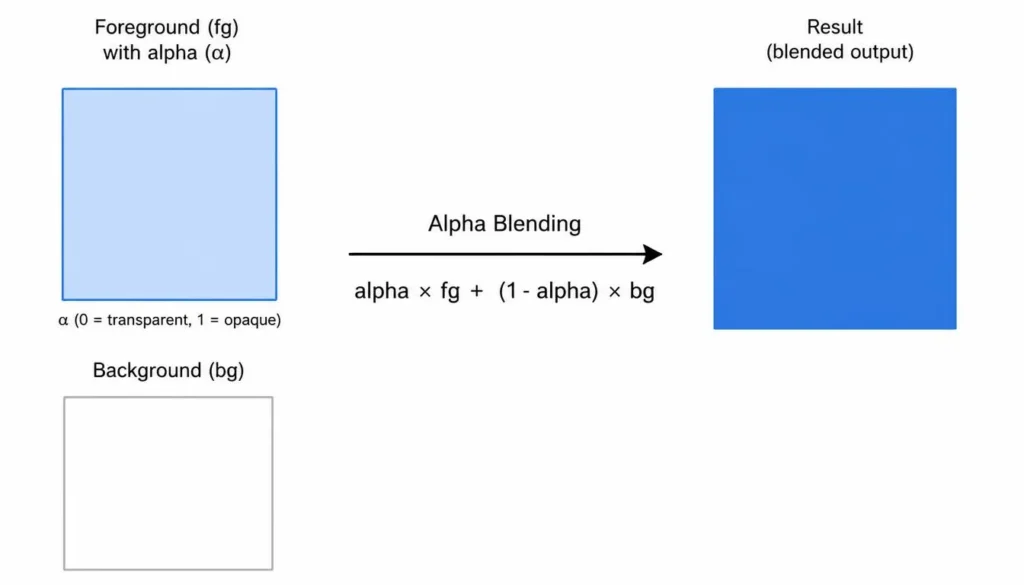
WCAG contrast-ratio math assumes two solid, opaque colors. A semi-transparent foreground color has no fixed luminance, it changes depending on whatever is rendered behind it. Running the raw RGBA value through a contrast checker as-is returns the wrong number.
The correct approach: composite the color against its real background first, then check contrast on the result.
| function compositeOverBackground(fg, bg) {
const alpha = fg.a; return { r: alpha * fg.r + (1 – alpha) * bg.r, g: alpha * fg.g + (1 – alpha) * bg.g, b: alpha * fg.b + (1 – alpha) * bg.b, }; }
// A 72%-opacity blue over a white card: compositeOverBackground( { r: 37, g: 99, b: 235, a: 0.72 }, { r: 255, g: 255, b: 255 } ); // -> { r: 97.7, g: 143.3, b: 240.6 } – check THIS color, not the raw RGBA |
Once you have the composited RGB value, run it through an ADA compliant color checker against the actual background it sits on, not the alpha value in isolation. This one step catches the majority of transparency-related contrast failures that pass a naive automated scan but fail manual review.
Conclusion
RGBA to HEX conversion comes down to two fixed operations: convert R, G, and B exactly as you would for plain RGB, then convert alpha from its 0–1 scale to a 00–FF hex byte and append it. The judgment call isn’t in the math, it’s in deciding when to bake alpha into a static 8-digit HEX code versus keeping it dynamic with rgba() or color-mix(), and remembering that any opacity value needs to be composited against its real background before you trust a contrast score. Run your own values through an RGBA to HEX converter to skip the manual arithmetic once the logic above is second nature.
FAQs
What is the formula to convert RGBA to HEX?
Convert R, G, and B to two-digit hex using value.toString(16), then convert alpha by multiplying it by 255, rounding, and converting that result to hex as well. Concatenate all four values in order to get #RRGGBBAA.
Does 8-digit HEX (#RRGGBBAA) work in all browsers?
Yes, in every current major browser, Chrome, Firefox, Safari, and Edge have supported 8-digit and 4-digit HEX since the CSS Color Module Level 4 spec landed around 2020. The main compatibility risks are Internet Explorer, which never supported it, and non-CSS contexts like Android XML, which use a different byte order.
Is #RRGGBBAA the same as #AARRGGBB?
No, they use the same characters but a different byte order. CSS’s 8-digit HEX format is #RRGGBBAA, with alpha last. Android’s ARGB hex format is #AARRGGBB, with alpha first. The same four values written in the wrong order produce a different, usually broken, color.
Can RGBA convert to HEX without losing any color data?
Yes, as long as the target is 8-digit HEX rather than 6-digit HEX. A 6-digit HEX code has no field for alpha, so converting RGBA to a 6-digit HEX necessarily drops the opacity value. An 8-digit HEX code preserves all four channels, red, green, blue, and alpha, exactly.