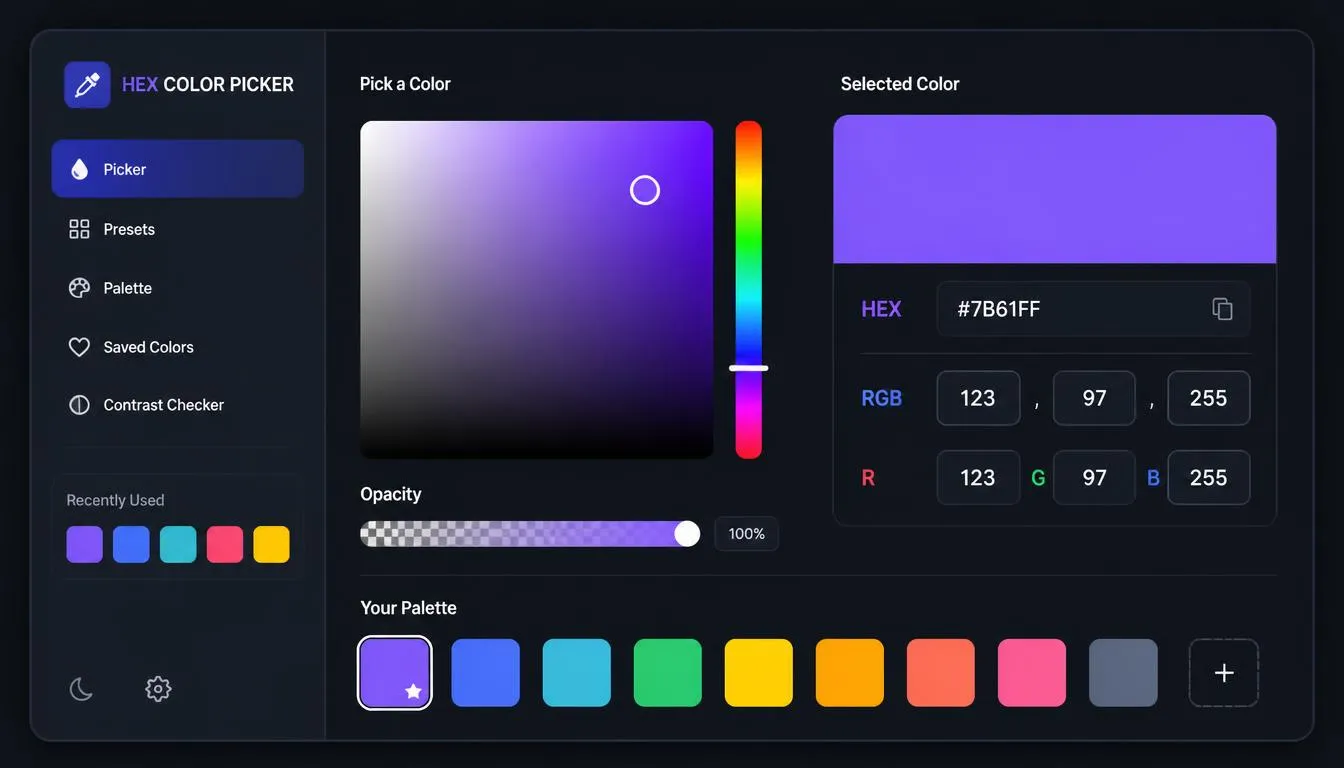
A HEX color picker is the foundational tool that bridges mathematical code and human visual perception. Whether you are defining a global CSS variable for a custom WordPress theme, generating a digital illustration, or optimizing UI elements for maximum conversion rates, the hexadecimal color code dictates exactly how a digital screen emits light.
This comprehensive guide explores the anatomy of a hex code color, the science of digital color models, and how to leverage color psychology in UX design to build high-performance interfaces.
Key Takeaways
-
Hexadecimal Basics: HEX codes use a base-16 numerical system to represent Red, Green, and Blue light values.
-
Digital vs. Print: Use HEX and RGB for digital screen rendering; always convert to CMYK for physical print materials.
-
UI/UX Psychology: Strategic color choices directly impact user trust and conversion rates (e.g., complementary colors for Call-to-Action buttons).
-
Accessibility First: Always test your selected HEX codes against WCAG contrast standards to ensure ADA compliance.
A HEX code (hexadecimal) is a six-character alphanumeric string used in HTML, CSS, and SVG design to represent a specific color. It operates on a base-16 numerical system, utilizing the numbers 0-9 and the letters A-F.
Every standard HEX code is preceded by a hash symbol (#) and is broken down into three distinct pairs representing the additive primary colors: Red, Green, and Blue.
-
Pair 1 (Red): The intensity of red light.
-
Pair 2 (Green): The intensity of green light.
-
Pair 3 (Blue): The intensity of blue light.
For example, the code #FF5733 translates to maximum red (FF), a moderate amount of green (57), and a low amount of blue (33), resulting in a vibrant orange. To see this in action, you can input this code directly into our HEX color picker tool.
Understanding the difference between RGB and CMYK—and how HEX fits into the equation—is mandatory for modern design.
The Additive Model: Screen Light (HEX, RGB, RGBA)
Screens create color by adding light to a black canvas.
-
RGB (Red, Green, Blue): Uses a base-10 scale from
0to255per channel.rgb(255, 0, 0)is pure red. -
HEX: The exact same light model as RGB, but written in a compact base-16 format. It is the gold standard for web development.
-
RGBA: Introduces a fourth “Alpha” channel (
0.0to1.0) to control transparency.
The Subtractive Model: Physical Print (CMYK)
Physical paper relies on absorbing light.
-
CMYK (Cyan, Magenta, Yellow, Key/Black): Uses percentage values of ink. Because digital screens cannot perfectly simulate physical ink absorption, a digital CMYK to RGB converter is necessary to approximate how a printed file will look on a monitor.
| Color Model | Base Structure | Primary Environment | Core Use Case |
| HEX | #RRGGBB |
Digital / Web | Custom theme customization, HTML/CSS |
| RGB | rgb(r, g, b) |
Digital / Web | JavaScript canvas, dynamic DOM manipulation |
| RGBA | rgba(r, g, b, a) |
Digital / Web | CSS overlays, drop shadows, glassmorphism |
| CMYK | C%, M%, Y%, K% |
Physical Print | Business cards, apparel, physical branding |
You cannot randomly select hex codes and expect a visually pleasing interface. Color theory provides a mathematical and psychological framework for combining colors effectively.
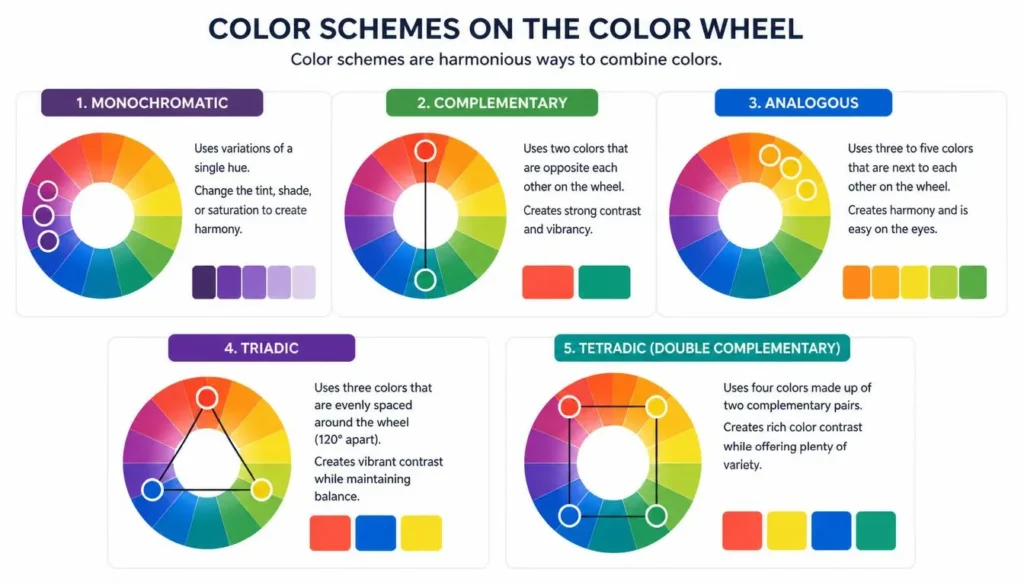
If you are struggling with how to choose a website color scheme, understanding these relationships on a standard color theory wheel is your first step:
-
Monochromatic Color Scheme: Utilizes varying shades, tints, and tones of a single base HEX code. This creates a clean, minimalist aesthetic popular in enterprise SaaS dashboards.
-
Complementary Colors: Two colors situated directly opposite each other on the color wheel (e.g., Blue and Orange). This creates maximum contrast.
-
Analogous vs Triadic Colors: Analogous schemes use three colors situated next to each other on the wheel, creating a serene, natural feel. Triadic schemes use three colors evenly spaced around the wheel, offering high contrast while maintaining overall harmony.
-
Tetradic Color Scheme: The most complex harmony, utilizing four colors comprised of two complementary pairs.
Once you understand the math behind these relationships, you can utilize a custom color palette maker to automatically generate perfectly balanced hexadecimal schemes based on your primary brand color.
Choosing a color is not just about aesthetics; it is about cognitive association. Color psychology in UX design heavily influences how users perceive brand trust, urgency, and hierarchy.
-
Blue (
#0000FF): Evokes trust, security, and stability. Highly preferred by financial institutions, tech startups, and healthcare providers. -
Red (
#FF0000): Signals urgency, excitement, and danger. Used for error states, destructive actions, and clearance sales. -
Green (
#008000): Associated with growth, success, and nature. It is the universal standard for “Success” toast notifications.
Best Colors for Call to Action Buttons
When optimizing conversion rates, contrast is more important than the specific hue. However, A/B testing consistently shows that Complementary colors convert best. If your website’s primary background is a soft blue, utilizing a vibrant orange (#FF8C00) or warm yellow for your primary “Sign Up” button will draw the user’s eye instantly through visual saliency.
An aesthetically pleasing UI UX color palette is useless if it is not legally accessible. Modern search algorithms (like Generative Engine Optimization) heavily reward websites that prioritize user experience and structural accessibility.
According to the Web Content Accessibility Guidelines (WCAG 2.1), text and interactive elements must meet specific contrast ratios against their background hex codes:
-
AA Standard: Requires a contrast ratio of at least
4.5:1for normal text and3:1for large text. -
AAA Standard: Requires a ratio of
7:1for normal text and4.5:1for large text.
Before deploying any code to a live environment, developers must run their chosen foreground and background HEX pairs through an ADA compliant color checker to verify compliance.
💡 Pro Tip: Embed a contrast checking workflow into your design phase to prevent costly re-designs after development has already started.
For front-end engineers, instantly translating color data is a daily requirement.
Legacy: Web Safe Colors
In the 1990s, monitors could only display 256 colors. Designers were restricted to a specific palette of 216 web safe colors (like #FF0000 or #003366). While modern displays render millions of colors effortlessly, adhering to standard, web-safe hex codes can still be highly effective for ensuring bulletproof HTML email template compatibility.
Dynamic Styling with CSS Gradients
Modern UI design frequently blends multiple hex codes to create depth. By routing two harmonious hex codes into a CSS gradient generator, developers can output cross-browser compatible code instantly:
/* Implementing a linear gradient using HEX codes */
.hero-section {
  background: linear-gradient(135deg, #FF5733 0%, #C70039 100%);
}
JavaScript: RGB to HEX Calculator
If your application accepts user input in RGB format but requires HEX for database storage, you need a programmatic RGB to HEX calculator function:
// Convert individual RGB channels to a unified HEX code
function rgbToHex(r, g, b) {
  return "#" + (1 << 24 | r << 16 | g << 8 | b).toString(16).slice(1).toUpperCase();
}

console.log(rgbToHex(255, 87, 51));
// Output: #FF5733
How do I choose a website color scheme?
Start by identifying the primary emotion you want your brand to convey using color psychology (e.g., blue for trust, green for growth). Establish this as your primary HEX code. Next, use a color wheel to find a complementary or analogous secondary color for your buttons and links. Finally, establish neutral hex codes for your text and background.
What is the difference between RGB and CMYK?
RGB (Red, Green, Blue) is an additive light-based color model used exclusively for digital screens. CMYK (Cyan, Magenta, Yellow, Key/Black) is a subtractive ink-based model used for physical printing. Because they operate on different physics (light vs. ink), a digital color will never look exactly the same when physically printed without careful conversion.
Why do some HEX codes look different on different monitors?
HEX codes represent a specific math value, but monitors are calibrated differently based on their hardware (panel type, brightness, sRGB vs. P3 color gamut). A hex code that looks vibrant on a modern high-gamut display may look washed out on an older, uncalibrated TN panel monitor.